IT Service Management Concepts
Definitions
- Customer: Someone in your organisation or company who needs the resources or services of I.T
- Service: A way to deliver value to customers by facilitating the outcome that a client wants to achieve.
- Service Asset: Any capability or resource that can be provided by a service provider.
- Service Management: A set or a group of specialised organisational capabilities or functions that provide value to customers in the form of services.
- Process Management “Manage to Process” – After why this is the where and the how as an organisation. Done by “Measurement and Control” measured with “Metrics”.
- Process Relationships Service Desk Support
Service Desk vs. Help Desk and Call Centres.
- Helpdesk is historically involved in incident response.
- Not a single point of contact for users or customers.
- Call Centre typically handles the large call volume.
- Service Desk has more significant responsibility than telesales or incident support
- The service desk is the consolidation, comprehensive, single interface between users and IT.
A service desk is the front end office for all other IT departments, and it is a single point of contact for requests or issues, responsible for incident management, service level management, change management, configuration management and release management.
Functions and Activities:
- Enhance users access to IT services, the first line liaison.
- Faster response or turnaround to requests while recording and tracking incidents and complaints.
- Improve communication and teamwork by informing about status, progress, assessment, changes (Short term and long term).
- Escalate Procedures based on SLA’s
- Managing request, ticket and change life cycles
- Coordinate with 3rd party solution providers.
- All of this should increase productivity.
Centralised Service Desk
- Centralised Responsibility for accepting and recording service calls, routeing, monitoring and escalation.
- Unified Business operations support.
- Uses a standard incident reporting and recording system.
- Bridges physical with operation via direct communication.
- Rapid response and proximity are objectives.
Local Service Desk (Distributed): Still has a centralised service desk but has multiple distributed local service offices. These are distributed by business units, geographically or roles.
Virtual Service Desk
- Modern Specialised version of the local service desk.
- Several Local service desks virtualised as single telecom unit.
- Provides global, round the clock (follow the sun) support.
- Difficult to provide on-site support.
- Phone numbers are often rerouted. During times when network centres business hours transition.
- Excellent solution for large multinational organisation.
Service Desk Personnel
- Call Centre Personnel
- Unskilled / call recording
- Skilled Service Desk
- Expert Service Desk
Personnel Attributes
- Articulate, organised and end user focused.
- Must understand business objectives and that
- User problems affect Business.
- “There is no support desk w/o the user or customer.”
- Might need bilingual skills
- Must be willing to find the answers.
Critical Factors for Success
- Know the business needs and goals – especially customer or user requirements.
- Invest in training in all affected areas.
- Clearly, define Service Desk objectives and deliverables.
- Service Level agreements should be practical with broad buy – in and reviewed / asses regularly.
- Benefits of service desk should go straight to bottom line.
Incident Management
Overview of Incident Management
- To lower or even eliminate effects or occurrences of IT interruptions, disturbances or quality reduction.
- Must get users back to work as soon as humanly possible.
- Hire appropriate specialists to record, classify and allocate (Route) all incidents.
- Progress should be monitored
- Incidents must all resolve.
- The process must be closed after resolution.
Objectives and Benefits of Incident Management
- Reduce impact on business by solving the issue as soon as possible
- Improve User Productivity
- Obtain independent customer focused incident monitoring
- Make SLA info readily available
- Lower cost of doing business
- React quickly and efficiently
- Active Monitoring of user domains and services
- Keep problems from escalating
- Improved user or customer satisfaction
- More accurate operations
- Prevent “too many cooks’”
Incident Records vs. Problem Records
- Incident records are end user focused.
- Incident reporting management focuses on measurements of downtime and business impact.
- Problem records start with IT management decision to invest IT recourse’s and end user downtime for cause investigation and implementation of the resolution.
- Problem records focus on internal IT processes.
- Management reporting on issues focuses on root causes and implementing structural recommendations.
Incident Escalation
- Pass the problem on to a higher expertise or authority level.
- Functional (Horizontal) Escalation.
- Hierarchical (Vertical) Escalation.
- Develop Horizontal first then vertical.
Benefits, Costs and Challenges
- Greater effectiveness, reduced business impact.
- Proactive enhancements and changes
- Business focused SLA management
- Improved monitoring and performance, service quality.
- Better staff utilisation and efficiency
- Eliminate future incidents and service requests
- more accurate database
- Enhanced customers or user satisfaction.
Costs
- Initial Planning and implementation – communication
- Training and ramp up
- Hardware and software tools
Challenges
- Users and staff bypass procedures
- Incident backlog – process overload
- Too many escalations
- Lack of precise definitions, SLA’s commitments.
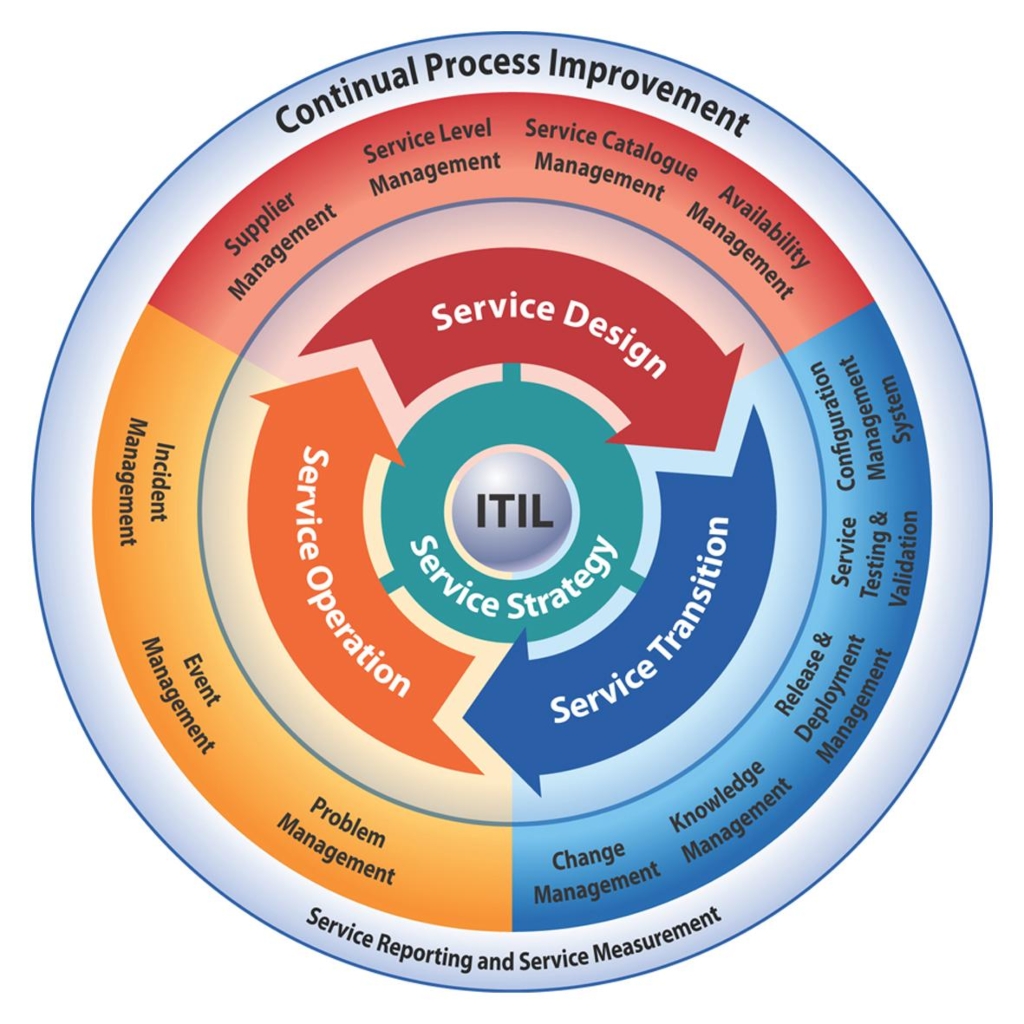
ITIL V3 Study Notes
Problem Management
- Problem management is closely related to the service desk and incident management.
- Primary concern is eliminating infrastructure errors.
- Underlying causes of actual and potential failures.
- Problem Management also tracks and monitors infrastructure.
- Problem > Known Error > Request for change
Problem Management vs. Incident Management
- The two have contradictory goals; many organisations combine the two processes – detrimentally.
- Problem Management supports incident management workstations and temporary solutions – no conflict resolution.
- Problem management takes the time to identify root causes of conflicts often extended periods of unplanned downtime.
- Optimally the two processes should be separated.
- Problem management is often escalation point for service desk IM.
PM Goals and objectives
- The difference between firefighting and fire prevention
- Minimise adverse effects on business
- Proactively prevent the occurrence of incidents, problems and errors.
- 1. ID Errors 2. Decision Making 3. Act accordingly
- Present proposals for improvement, rectifying mistakes, responding to RFC’s
- Identify weaknesses or vulnerabilities in infrastructure.
Problem Management Process
- Inputs: Incidents, Service Desk, Fixes, Configs, Data from vendors, Service Level Agreements, records, logs, performance metrics.
- Main Actions: Problem Control, Error Control, Proactive Management, Reports / Documentation.
- Outputs: Problem Database, Request for changes, problem records, closed records.
Problem Control
- Identifying problems, investigating and diagnosing the root causes.
- Turn problems into known errors through classification, investigation and diagnosis
- Generate RFC then resolve and close the case.
- The classification includes categorization, impact, urgency, priority and status.
- Investigation and diagnosis are repeated to get closer to resolution.
- Temporary or emergency fixes may be applied.
Error Control
- Monitoring and managing known errors until resolved.
- Issues RFC to change management IT service.
- May evaluate shifts in a post-implementation review.
- Can involve several departments or units.
- Includes error identification and recording, error assessment, documenting resolution closing the case.
- Tracking and monitoring are done through all stages.
Proactive Problem Management
- Focuses on quality of infrastructure and services.
- Uses trend analysis to prevent problems and incidents.
- Look for weaknesses, perform penetration testing, and keep up with vendor alerts and bulletins.
- Firewall to prevent inter-domain problems.
- Overall identification and ongoing investigation of systems.
The Problem Manager
- Maintain all problem or error control procedures.
- Asses effectiveness of project management process.
- Protect Integrity and Independence of incident management.
- Govern proactive prevention campaigns.
- Manage personnel and resources (Acquisition).
- Develop and improve processes.
- Conduct “Postmortem” reviews.
Change Management
- Most incidents are directly related to change.
- Change management is like a thermostat.
- The goal of change management is to manage the change process and limit the introduction of errors and incidents related to the changes.
- Innovation, improvement, modifications, corrections.
- Change management is tightly coupled with configuration management and release management.
Change Management Actions
- 1. Recording
- 2. Acceptance
- 3. Classification
- 4. Planning and approval
- 5. Coordination
- 6. Evaluation
Recording
- All RFC’s are logged with a reference number of known error.
- Routine, standard changes don’t generate RFC’s (Service requests not assessed by change management).
- RFC;s come from Problem Management, IT Staff, customers, legislation and mandates, vendors and suppliers, projects.
- The log should contain: RFC unique ID, cross-referenced known-error/ problem number, description, the reason for the change, current/ new version, info about submitter, submission date, estimated time frame, resource allocations.
Acceptance
- Initial assessment with re-request option for RFC, change incident (CI) (AKA Change item or instance).
- Acceptance will lead to 1- status change of existing CI, change in the relationship between CI’s, New CI, new location or owner of CI.
- Information needed to further process change is included in the change record.
Classification
- Priority and Category are designated for accepted RFC.
- Example Priorities: 1. Low 2. Normal3. High. 4 Highest (Critical).
- Priorities and categories determined with Change advisory board possibly steering committees.
- Sample Categories, minor, substantial and major impact.
Planning and Approval.
- Change Management uses change calendar or FSX – Forward schedule of changes to the plan.
- FSC contains Approved change details, planned implementation dates.
- Change management with CAB accepts three aspects of change. 1 Financial, 2. Technical, 3. Business impact of change.
- Also, includes estimating impact and resources.
Coordination
- Approved changes go to product specialists who construct and integrate changes.
- Before implementation, changes should be pilot tested.
- This may involve release management IT service.
- Phases: Build – Test – Implement.(Coordination between these three stages)
Evaluation
- All applied nonstandard changes should be assessed.
- Did change meet intended goal?
- Are all parties satisfied with the result?.
- What were unplanned side effects of change?
- Did implementation exceed estimated costs or downtime?
- RFC is closed after success and evaluation.
- Results are documented in the P.I.R.
Change Manager Role
- Overall responsibility for change management in consultation with the administration liaison and change advisory board.
- Maybe a single individual or steering committee.
- In charge of reaching all change management goals and developing a method of ensuring effectiveness and efficiency.
- Defines the scope of change management and associated process.
- Receives, logs and priorities RFC’s, convenes CAB to review. Submits change advisory board recommendations.
Release Management
Release Management Basics
- Major release – major roll out, a substantial increase in overall functionality, eliminate errors. e.g. v.1 v2 v3 etc
- Minor software release – includes minor enhancements, interface changes, fixes, hardware support e.g. v1.1 v1.2 v3.2
- Hardware upgrades – improved support or functionality.
The Goals of Release Management
- Garner Holistic view of IT Service change.
- Assure Technical and Non-technical Aspects are considered. RM is Hands on a working group for change management.
- Manage Release Planning and Policy, design, building and configuration.
- Campaigns for acceptance plans the eventual rollout.
- Conducts extensive training and auditing (Post)
- Preparation, Installation Training
- Storage, Release, Distribution, install of software.
Release Types – Full (Test and distribute all the components of the release unit, whether or not they have changed since the last released) – Delta (Does not alter all elements, also known as a partial release) – Package- (like Microsoft Office)
Release Management Development Environment
- Release Policy
- Release Planning
- Design and Develop Software OR –
- Purchase Software or Hardware
Release Management Control Test Environment
- Build and configure (With back out plan)
- Fit for purpose tests
- Release Acceptance
- Roll out planning
- Communication, preparation and training
Release Management Live Environment
- Release Distribution.- Audit trails, the chain of custody.
- Installation.
- Costs and Potential Problems.
Costs and Pitfalls of Release Management
- Personnel, DSL / DML / DHS storage (Backup and Recovery too)
- Build / Test / Distribution environments
- Software and Hardware Costs – Installation
- Pitfalls / Challenges: Resistance from parties, circumventing release management process, distribution is out of sync, inadequate testing.
Configuration Management
Concepts and Objectives
- The goal is to keep information about IT Infrastructure current, specific item details and relationship to other elements.
- Makes sure changes have been correctly logged or documented.
- Maintains accurate topology of existing config items (CI)
- Provide information about product policy, troubleshooting Data, Impact assessment, provisioning of services.
- Concepts – Configuration Item
CMDB (Service Transition)
- CMDB is a DB store of config records through the lifecycle.
- Configuration Management system contains one or more CMDB’s
- Each DB stores attributes of CI’s and interrelationships
- CMDB is Designed Based on a configuration structure
Configuration Item Attributes
- ITIL Mandatory = Unique Identifier, Status
- Optional Attributes = Revision Number, location, owner, asset number, manufacturer, manufacturer serial number, part number, cost, release date, expiry date, configuration details, license data, link to documentation, category, the value after depreciation, comments.
- Other Linked fields to other Databases = RFC Numbers, change numbers, problem numbers, incident numbers.
Benefits of Configuration Management
- Manage IT Components and services.
- Contributes to faster troubleshooting and change processing
- Better control of software and hardware.
- Improved security and compliance
- Enhanced planning for procurement or expenditures
- Support for capacity management and availability management
- Configuration management is the foundation for IT continuity management.
Configuration Management Process Planning – Identification – Control – Status Accounting – Verification – Reporting
Costs and Challenges
- Added hardware, software licenses, fees.
- Database and CMS design, implementation, maintenance.
- Erroneous CMDB scope and CI detail are challenges.
- Timing is moving from manual to automated systems.
- Effects of sudden changes
Service Level Management
Key SLM Terminology
- Service Level
- Service Level Target
- – S.M.A.R.T (Specific, Measurable, Achievable, Relevant, Timely)
- Service Level Agreement (SLA)
- SLM
- Service Level Requirement (SLR)
- Service Hours – period
- Service Capacity Management (SCM)j
Goals and Scope of SLM
- Maintain and Improve IT Service Quality via Continual Consensus, Monitoring and logging by eliminating poor service.
- SLM Builds long term relationships with all parties.
- SLM Covers every aspect of IT Service Provisioning
- Also concerned with customer or vendor negotiations
- SLM is at the top of responsibility chain.
Costs vs. Benefits
- Informed Decisions with customers must be made.
- Costs are Staffing, Accommodation, Support tools, hardware costs, and marketing costs.
- Benefits of Service Level Management are extensive.
- Improved relationships and customer perception of IT.
- Clear Demarcation between IT groups / IT and clients.
- Isolated Targets for measuring and reporting.
- IT goals are much more “Business-Centric.”
- Expectations are easier agreed upon and Met.
- The baseline for measuring vendor performance.
- Clearly defined IT services.
The SLM Process
- Identifying
- Defining (According to ISO 9001 Model)
- Finalising – Contract, SLA
- Monitoring – Logs, Documentation and Reporting.
- Reporting
- Reviewing
The SLM Manager
- SLM manager manages to interface with customers and IT.
- SLM Manager is both customer and IT advocate
- Must be a diplomat and facilitator.
- HE/She must strive to be objective or impartial.
- Rare combo of technical expertise and interpersonal manager.
- SLM manager needs to be intimate with all other IT service areas.
- Aligns all operational and tactical IT processes with business objectives.
IT Services Financial Management
Basic Concepts
- Goal is to promote cost awareness and Providence
- IT services Must address Quality, Cost and Customer Needs (First 2 often contradict)
- Budgeting – List
- Accounting
- Charging (All the things you do to bill your customer for the provided service)
- Costs
Types of Costs (Categories)
- Direct costs vs. indirect costs
- Fixed vs. Variable costs
- Capital vs. operational costs
- Cost elements: ECU, SCU, OCU, ACU, TCU, CA
Goals of IT Financial Management
- Reduce long-term costs – empower management
- Declares Added Value of IT.
- Improved Total cost of ownership and return on investment
- Forces business to make service levels and their costs more visible.
- Assures senior management/ stakeholders that IT is well managed and meeting business needs.
- Assists change management processes.
Financial Management Activities
- Budgeting
- Accounting
- Charging
- Reporting
Budgeting
- Planning / managing financial activities of the organisation.
- Involves corporate and strategic long-term planning (One to five years)
- Incremental vs. Zero Base Budgeting
- Process = Sales & Marketing; production “Administrative “ cost and investment
- Determine the budget period.
Accounting
- Identifying and Qualifying Costs & Expenditures
- Understand the way costs are structured.
- Defining Costs Elements (One year fixed)
- The base cost structure on a service structure. (Cisco IIN)
- Subdivide cost, units for personnel, hardware, software and overhead.
- Budgets are formed annually for each cost element and service (Based on past analysis, growth).
Charging
- Tool to allow for careful usage of IT Resources.
- Should be compatible with organisations financial policies
- Used to recover all incurred costs of IT business unit.
- Charging Policy should include, communication, pricing, flex ability, notational charging.
- The pricing policy should cover, cost plus, going rate, target return, negotiated contract price.
Reporting
- Invoicing and Communicating to the customer
- Conduct Regular meetings with the customer under the umbrella of service level management based on service level agreements.
- Service level manager is reported to with the following: – IT expenditures per customer, differences in actual / estimated charges / Methods for accounting and charging/ Disputes and their solutions.
Possible Pitfalls
- IT personnel are often unfamiliar with monitoring calculating and charging costs.
- May often require substantial non-IT information.
- Difficult to find people with Dual Expertise.
- Difficult to accomplish if corporate strategy objectives have no focus set down in policy.
- Because of above factors, noncooperation is common.
- Lack of management commitment trickles down.
Capacity Management
Basic Terminology
- Capacity Management – Capacity is the maximum throughput of it service or configuration item can deliver while it meets the agreed upon service level target
- .Performance Management
- Application sizing
- Workload management
- Capacity Planning
- Modelling
Benefits of Capacity Management
- Efficient Management of resources to reduce IT risk through continuous monitoring.
- Understand the impact of new or changed services.
- Cost reduction and maximised investment.
- Reduced Disruption of Business via link to change management
- Quicker Response to customer needs. Lower Capacity, related expenditures.
Business Capacity Management
- Gain Knowledge of current and future business requirements and goals.
- Data gathered from customer, strategic planning, marketing campaigns, and trend analysis.
- BCM involves trending, proactive modelling, forecasting, prototyping, sizing and documenting present and future business requirements.
Service Capacity Management
- Determine usage of IT products/services to customers.
- Understand performance or peak loads to meet SLA’s
- SCM is tightly coupled to SLM
- Involved with SLA negotiations
- Service Capacity Management Engages in Monitoring, analysing, tuning, and reporting on service performance.
- Established baselines for service usage.
- Manages the demand for services.
Resource Capacity Management
- To decide on the use of IT Infrastructure / Components.
- Stay current on technological developments and actively monitor trends.
- Monitoring, analysing and reporting on infrastructure and component utilisation, profiling and base lining.
Activities of Capacity Management
- Develop the Plan
- Modelling
- Application Sizing
- Monitor
- Analyse
Costs and Related Issues
- Hardware & Software tools and CDB Management
- Project Management Costs
- Personnel, training and support overhead.
- Related facilities and services.
- Unrealistic expectations
- Lack of data and supplier input.
- Complex implementations
- Lack of Buy-in from management.
Availability Management
Availability Management in a Nutshell
- Making sure IT Services are there when needed. Defined in SLA’s via SLM integration.
- Monitors Availability from End to End
- Also, Works with problem management service
- The goal of availability management is to optimise IT infrastructure.
- Must maintain customer or user satisfaction.
Fundamental principles of Availability
- IT Services Must be Consistently Accessible
- One Time Disruptions Must be Addressed Rapidly and Completely – No Repeat Incidents.
- Availability is Mission Critical Business/ Infrastructure component.
- 4 Basic “Abilities of availability Availability – Reliability – Maintainability – Serviceability
- 3 Levels of Availability High Availability (Unplanned) – Users/Customers are shielded and isolated from component failures by clustered failover configurations and redundant appliances, circuits and routeing switching logic.
- Continuous Operation (Planned) – Attempts to protect the user from adverse effects of planned downtime/outage load balancing and clustering is used to allow individual components to be brought offline without service disruption.
- Continuous Availability (Planned and unplanned) – Attempts to isolate users from effects of planned OR unplanned downtime. This is a combination of high availability Availability Activities Determine Availability Requirements – Design for availability – design for maintainability – identify security issues – Maintenance management – measuring and reporting – develop availability plan.
Availability Management Metrics
- MTTR – Average time to repair after failure.
- MTBF – Measures and reports reliability / resilience
- MTBSI – Also measures reliability (MTBF + MTTR)
- MTRS – Average time to restore after a failure.
Methodologies for Availability Management
- Component Failure Impact Analysis (CFIA)
- Fault Tree Analysis (FTA)
- CCTA Risk Analysis and Management Method (CRAMM)
- Service Outage Analysis (SOA)
Service Continuity Management
Overview
- Also known as disaster recovery
- Disaster – Goes far beyond Incidents
- Consists of business continuity planning and continuity planning
- Emphasis is on disaster prevention (avoidance)
- Supports overall business continuity management (BCM)
- Deals also with restoration and recovery.
Types of Disasters
- Fire, Flood (Water Damage), Lighting, Tornado (Wind), Burglary, Vandalism, Violence, Terrorism, sabotage, Power outage, brown outs hardware failure, DoS Attacks, Access Attacks.
Risk Assessment – Identify Asset, Analyse threats, ID and classify vulnerabilities, evaluate and estimate risk.
IT Service Continuity Strategy
- Elaborate Prevention Measures (Stronghold / Fortress)
- Choose recovery options – Personnel, Accommodations, IT Systems, Networks, Support Services, Archiving
- Viable Options: No response – paper-based system, reciprocal relationships, cold standby, warm standby, hot start / hot standby, hybrid approach.
Costs and Potential Problems
- Time and Finances are extensive for planning, initiating, developing and implementing
- Risk Management Personnel, software, hardware
- Recovery arrangements (Hot sire, warm site) are typically expensive solutions.
- Resources and commitment issues or budgeting.
- Assessing Recovery Sites
- No management responsibility / Buy in (Risk Takers? Let insurance handle IT )
- Perpetual Delays
- Black Boxing
- Lack of In-house IT Expertise
- Lack of Business Familiarity and Awareness.
IT Security Management
The Big Picture
- External Unstructured Threats
- External Structured Threats
- Internal Unstructured Threats
- Internal Structured Threats
Goals to guarantee in security
- Confidentiality
- Integrity
- Availability
- Non – Repudiation
More critical terminology
- Threat
- Threat Agent
- Risk
- Vulnerability
- Exposure
- Countermeasure
Security Management Process: Control – Plan – Implement – Evaluate(Self-assessment, internal and external audits) – Maintain – REPORT
Security and the SLA
- SLA must define extent that security is provided
- Security elements must be customer specific
- Customer Determines Security Policy
- Security Needs to be compared with providers service catalogue > Gap Analysis performed > Then negotiation.
- Operational Level Agreement (OLA) will have a security section as well.
Costs and Possible Pitfalls
- Personal, Cash outlay
- No security / Poor security = lost production, replacement, data loss/ damage, goodwill diminished, reputation, legal action, government fines.
- Lack of commitment and ambition
- Poor attitudes and human behaviour
- Lack of awareness training – verification checks
- No change management service.
- Lack of detection systems (IOA, IPS, FN)
- Over-reliance on reactive techniques.
I hope that these notes help you in passing your ITIL v3 Foundation test!
Warmest Regards,

Sonny Brown